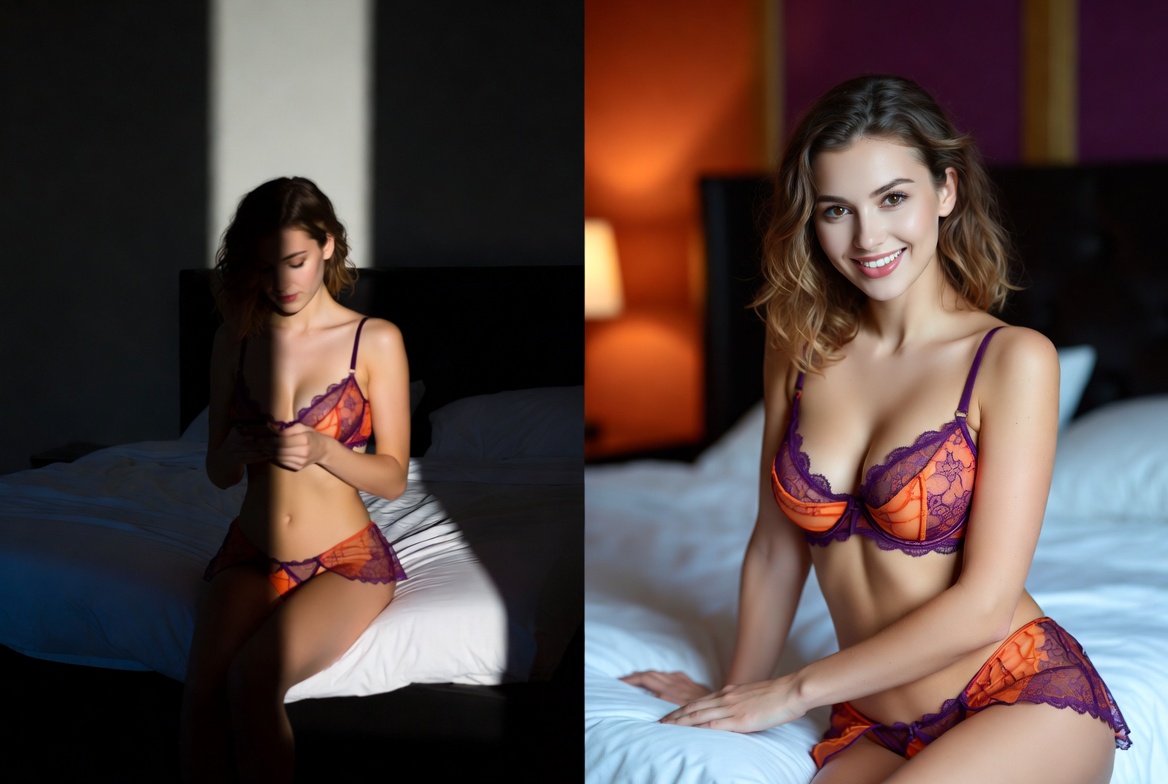
The quality of animation (image-to-video) depends directly not on the "power" of the neural network, but on how informative and readable the source image you upload is. The model doesn't know what a person looks like in real life—it relies solely on visual data from the photo. Therefore, the user's task is to provide the most "clean" and unambiguous material possible.
Below is a practical system for selecting photos that consistently improves result quality.
1. The Face — The Primary Source of Identity
The face must be fully readable. This is a fundamental rule that determines whether similarity will be achieved in the video.
Ideal Scenario:
- The face is fully within the frame
- Eyes, nose, and lips are clearly distinguishable
- Gaze is directed at the camera or slightly to the side
- No strong shadows on half of the face
Why This Is Critical:
AI doesn't "know" who is depicted. It analyzes facial geometry and texture. If part of the data is missing (e.g., an eye is closed or it's a profile), the model is forced to generate the missing details itself. This is exactly where "different" faces appear in videos.
2. Shot Scale: The Closer, The More Stable
Optimal: portrait or half-portrait shots.
Good Formats:
- Face + shoulders (head & shoulders)
- Close-up
- Medium portrait where the face occupies most of the frame
Poor Formats:
- Long shots (full body without focus on the face)
- Group photos
- Shots where the face occupies <20% of the image
Why This Works:
The more pixels dedicated to the face, the more accurately the model captures the structure: cheekbones, eye shape, lip line.
3. Lighting: The Hidden Factor That Breaks Results
Lighting affects how the neural network "sees" skin texture and facial volume.
Best Conditions:
- Soft daylight
- Even lighting without harsh shadows
- Studio lighting or natural diffused light
Problematic Conditions:
- Backlighting (face in shadow)
- Strong shadows on half of the face
- Colored neon sources without balance
Why This Matters:
With poor lighting, the model starts confusing real features with shadows and "draws in" non-existent details.
4. Angle and Pose: The Simpler, The More Accurate
Complex angles are one of the main causes of distortion.
Recommended:
- Gaze directed at the camera
- Slight head turn (10–30°)
- Neutral facial position
Better to Avoid:
- Profile (three-quarter view)
- Strong head tilt backward or downward
- Covered parts of the face (hand, hair, accessories)
Why This Matters:
With non-standard angles, the model loses facial symmetry and starts "rebuilding" the face from scratch.
5. Image Quality: The Fewer Noises, The Better
Even slight quality degradation significantly impacts the final result.
Suitable Photos:
- High sharpness
- Visible pores, eyes, lips
- Absence of digital noise
Unsuitable:
- Screenshots from videos or stories
- Heavily compressed images
- Old photos with artifacts
Why This Is Critical:
The neural network amplifies existing defects. If there is noise at the input, the output will be a "floating" face.
6. Face Scale in the Frame
Optimal rule:
The face should occupy the majority of visual attention
If the face is small:
- The model starts "guessing" details
- The probability of feature changes increases
- Animation stability deteriorates
7. Appearance Stability (An Important but Often Ignored Factor)
If the person in the photo:
- Has heavy makeup
- Is in an unusual angle
- Has filters applied
...the result may differ from the real-life perception of the person.
Why:
The neural network copies the photo itself, not the "personality." It doesn't know how the person looks without filters.
8. Practical Photo Selection Scheme (Quick Checklist)
Before uploading, check:
- The face is fully visible
- No obstructing elements
- The shot is close-up
- Lighting is even
- No strong shadows
- The photo is not blurred
- The face occupies the main part of the frame
If at least 2–3 items are not met, the result will be unstable.
Conclusion
The quality of AI animation is not magic, but working with input data.
The neural network doesn't fix the photo; it interprets it. Therefore:
The simpler, cleaner, and closer the face in the source, the more realistic and stable the video will be.